Platform Overview
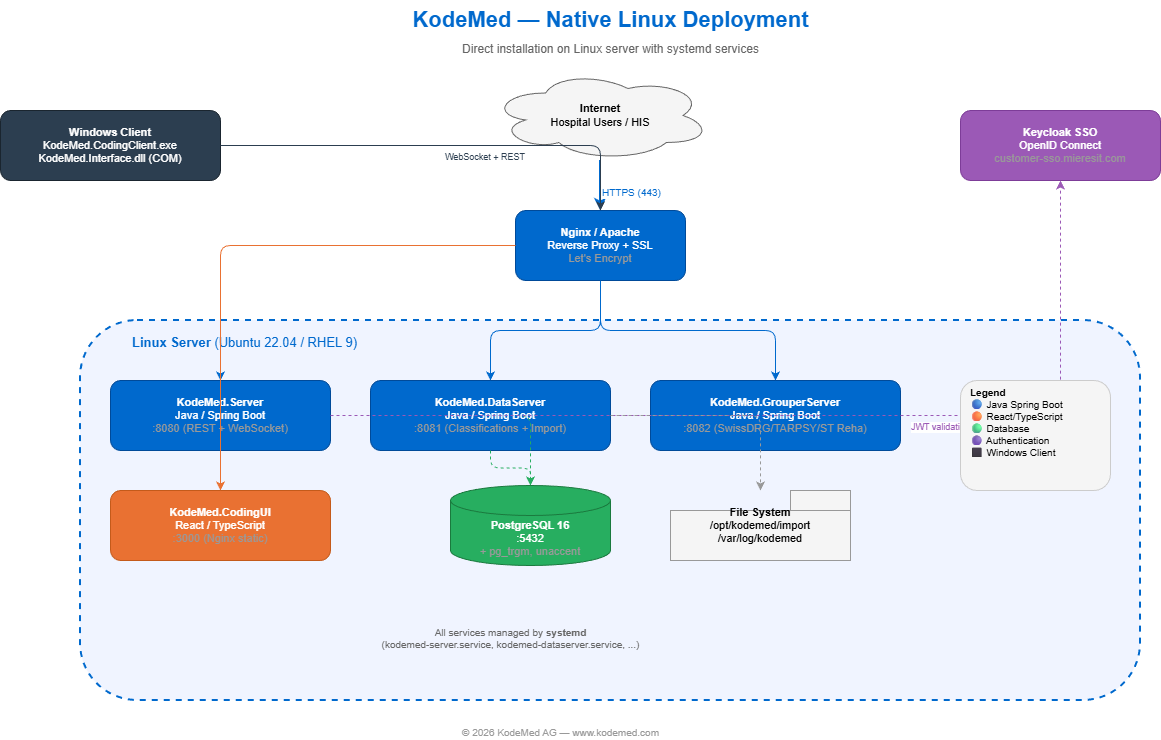
Server
REST API, WebSocket, session management, audit logging
Spring Boot • Port 8080DataServer
ICD-10, CHOP, ATC catalogs, SwissDRG classification data
Spring Boot • Port 8081Grouper
SwissDRG, TARPSY, ST Reha real-time grouping engine
Spring Boot • Port 8082CodingUI
React web interface with 14+ data blocks, multilingual
React / Vite • Port 3000COM DLL
In-process HIS integration for .NET, VB6, VBA, C#, Delphi
Windows • KodeMed.dllCodingClient
System tray app, WebSocket, webhook, auto-reconnect
Windows • WebView2 • MSISecurity & Compliance
🔒 Authentication
- OAuth2 / OpenID Connect (SSO)
- Keycloak, Azure AD, Okta compatible
- JWT token validation on every request
- Per-client credentials (DLL, UI, Portal)
🛡 Data Protection
- GDPR Art. 32 — AES encryption at rest
- TLS 1.2+ for all network communication
- No patient data stored on client
- Configurable data retention policies
📑 Audit & Logging
- Full audit trail for all coding sessions
- User, timestamp, action, IP address
- Structured JSON logs (ELK / Splunk ready)
- 90-day default retention (configurable)
⚙ Container Security
- Non-root containers (UID 1000)
- Read-only root filesystem
- Drop ALL Linux capabilities
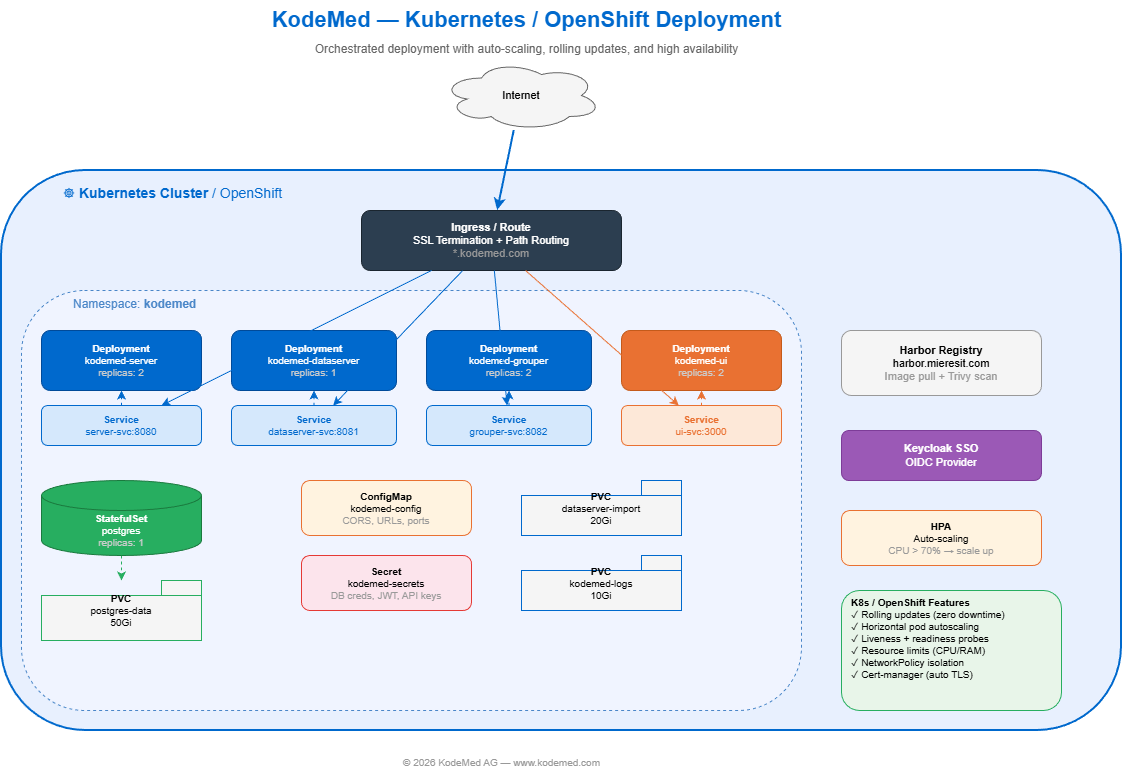
- Network policies (namespace isolation)
🔑 Licensing
- RSA-4096 signed offline license file
- Per-component validation (Server, DataServer, Grouper)
- License types: DEMO, TRIAL, PRODUCTION
- API status:
GET /api/v1/license/status
Documentation
Windows Client
MSI Installer
No admin rights required. Installs per-user to %LOCALAPPDATA%\KodeMed. Supports silent mode for enterprise deployment (GPO, SCCM, Intune).
Download MSI
Silent install: msiexec /i KodeMed.msi /quiet /norestart SERVERURL="https://kodemed.hospital.ch"
Log in for individual files, documentation, and advanced options.
Windows Client — Advanced Options
Enterprise deployment (IT administrators)
Silent Install — MSI (GPO / SCCM / Intune)
MSI properties:
SERVERURL (required) •
LANGUAGE — de, fr, it, en (default: auto-detect) •
AUTOSTART — 1 or 0 (default: 1) •
INSTALLDIR (default: %LOCALAPPDATA%\KodeMed)
Config location: %LOCALAPPDATA%\KodeMed\kodemed-client-config.json •
Prerequisites: Windows 10+, WebView2 Runtime (usually pre-installed)
Individual Files
Linux Server
Server Installation Package
Contains Server, DataServer, GrouperServer, CodingUI, and installer scripts.
- kodemed-linux-latest.tar.gzDownload
Support
Technical support and documentation: https://demo-docs-kodemed.mieresit.com
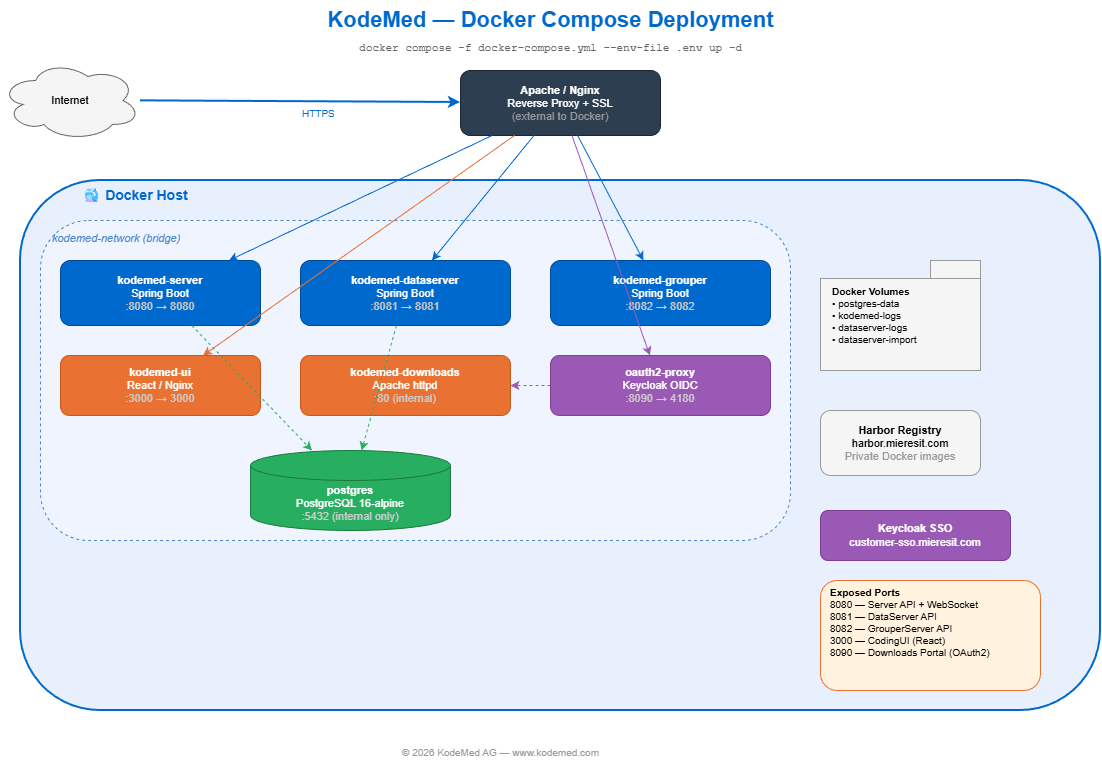
Deployment Wizard Docker Compose
This wizard generates a ready-to-use deployment package for your hospital’s on-premise server. Fill in the fields below and click Download ZIP to get:
docker-compose.yml— orchestrates all KodeMed services (Server, DataServer, Grouper, CodingUI, PostgreSQL).env— passwords, URLs, and settings (keep this file secure)runtime-config.js— browser configuration for the CodingUI
1. Public URLs (browser-accessible — used by CodingUI and DLL clients)
These are the URLs your users will access from their browser or DLL client. They must be reachable externally (via reverse proxy, load balancer, or direct).
2. Internal Service URLs (Docker network — usually keep defaults)
These are the internal Docker network URLs used in docker-compose.yml. Keep the defaults unless you use an external reverse proxy or custom network.
3. Database
KodeMed requires PostgreSQL 15+. You can use the bundled container or connect to your hospital’s existing database server.
4. Authentication (OIDC / SSO)
Connect KodeMed to your hospital’s identity provider (Keycloak, Azure AD, Okta, etc.) for single sign-on. Leave blank to configure later.
5. Security & Advanced Options
Optional settings for GDPR compliance, CORS, and logging. Sensible defaults are provided — only change if your infrastructure requires it.
Quick Start
After downloading the ZIP, deploy on your Linux server:
All services start automatically. The CodingUI will be available on port 3000. Import classification data via the DataServer admin API (port 8081).
Note: The GrouperServer requires specs/ and catalogues/ directories with SwissDRG/TARPSY/ST Reha specification files. Contact support for the grouper data package, or download from SwissDRG.org.
Technical Documentation Confidential
Classification Data Import
Official Swiss medical classification data (ICD-10-GM, CHOP, SwissDRG, TARPSY, ST Reha) can be downloaded from the sources below and imported via the DataServer admin API. See the DevOps Guide §14 for details.
- ICD-10-GM (BfArM) BfArM.de
- CHOP, CIM-10 FR/IT (BFS) BFS.admin.ch
- SwissDRG, TARPSY, ST Reha (SwissDRG AG) SwissDRG.org
DevOps Guide Confidential
Server Administration & Deployment
Markdown Documentation
- DevOps & Server Admin Guide MD
Troubleshooting
DLL client opens wrong URL (404 on coding page)
KODEMED_PUBLIC_UI_URL is not set. The server returns its own URL instead of the CodingUI URL.
The server logs a warning at startup: CONFIG ⚠ KODEMED_PUBLIC_UI_URL is not set
WebSocket returns HTTP 200 instead of 101
Reverse proxy is not upgrading WebSocket connections. Enable mod_proxy_wstunnel (Apache) or add Upgrade headers (nginx).
Portal returns 500 on login
Check oauth2-proxy logs: docker compose logs kodemed-downloads-auth
unauthorized_client → Client secret mismatch with OIDC provider
invalid_scope → Remove groups from OAUTH2_PROXY_SCOPE
invalid_redirect_uri → Check redirect URI matches OIDC client config
Server startup configuration warnings
Check logs after deployment:
CONFIG ✓ All public URL configuration present — all good
CONFIG ⚠ KODEMED_PUBLIC_* — specific variable is missing
Required Environment Variables
| Variable | Required | Purpose |
|---|---|---|
KODEMED_PUBLIC_UI_URL | Yes | CodingUI URL for browser redirect |
KODEMED_PUBLIC_SERVER_URL | Recommended | Server URL for DLL clients |
KODEMED_PUBLIC_DATASERVER_URL | Recommended | DataServer URL for classification data |
KODEMED_PUBLIC_WEBSOCKET_URL | Recommended | WebSocket URL for real-time communication |
OIDC_ISSUER_URI | Yes | OIDC issuer for token validation |
CORS_ALLOWED_ORIGINS | Yes | Allowed origins for API requests |
Sales Materials Confidential
License Generator Admin + Sales
Generate License File
Fill in the customer details below. The tool generates a signed kodemed.license file ready to send to the customer.
CLI Command
Run this on a machine with the private key and the kodemed-license-cli.jar:
License CLI Tool
Download the CLI JAR to generate and verify license files.
- kodemed-license-cli.jar Download JAR
- Quick Reference
java -jar kodemed-license-cli.jar generate --private-key key.pem --type DEMO --org "Hospital" --days 90 --output kodemed.license
Configuration Reference
Complete list of all environment variables, settings, and config keys across all KodeMed components. Use the filter to search.
KodeMed Server Port 8080
Main coding API — Spring Boot backend handling DLL sessions, WebSocket, persistence, webhooks.
| Environment Variable | Default | Description |
|---|---|---|
SERVER_PORT | 8080 | HTTP server port |
SPRING_PROFILES_ACTIVE | (none) | Active Spring profiles (use prod for production) |
SPRING_DATASOURCE_URL | jdbc:h2:mem:kodemed | JDBC connection URL (PostgreSQL in prod) |
SPRING_DATASOURCE_USERNAME | sa | Database username |
SPRING_DATASOURCE_PASSWORD | (empty) | Database password |
SPRING_DATASOURCE_DRIVER_CLASS_NAME | org.h2.Driver | JDBC driver class (org.postgresql.Driver in prod) |
SPRING_DATASOURCE_HIKARI_MAXIMUM_POOL_SIZE | 15 | HikariCP max connection pool size |
SPRING_DATASOURCE_HIKARI_MINIMUM_IDLE | 5 | HikariCP minimum idle connections |
SPRING_DATASOURCE_HIKARI_IDLE_TIMEOUT | 300000 | HikariCP idle timeout (ms) |
SPRING_DATASOURCE_HIKARI_CONNECTION_TIMEOUT | 20000 | HikariCP connection timeout (ms) |
SPRING_JPA_HIBERNATE_DDL_AUTO | update | Hibernate DDL strategy (consider validate for prod) |
KODEMED_AUTH_ENABLED | true | Enable/disable OAuth2 authentication |
SPRING_SECURITY_OAUTH2_RESOURCESERVER_JWT_ISSUER_URI | (Keycloak URL) | OIDC issuer URI for JWT validation |
SPRING_SECURITY_OAUTH2_RESOURCESERVER_JWT_JWK_SET_URI | (Keycloak certs URL) | JWK Set URI for JWT validation |
CORS_ALLOWED_ORIGINS | (empty) | Comma-separated CORS allowed origins |
WEBSOCKET_ALLOWED_ORIGINS | (empty) | WebSocket allowed origins |
KODEMED_ENCRYPTION_KEY | (empty) | AES-256 key (base64, 32 bytes). Generate: openssl rand -base64 32 |
KODEMED_LICENSE_FILE | (auto-search) | Path to kodemed.license file |
KODEMED_PUBLIC_SERVER_URL | (auto-detected) | Public URL for the server API (returned to DLL) |
KODEMED_PUBLIC_DATASERVER_URL | (auto-detected) | Public URL for DataServer (returned to DLL) |
KODEMED_PUBLIC_WEBSOCKET_URL | (auto-detected) | Public WebSocket URL wss:// (returned to DLL) |
KODEMED_PUBLIC_UI_URL | (auto-detected) | Public URL for CodingUI (returned to DLL) |
KODEMED_OAUTH2_REALM | kodemed | OAuth2 realm name (returned to DLL) |
KODEMED_OAUTH2_CLIENT_ID | kodemed-dll | OAuth2 client ID for DLL authentication |
KODEMED_PERSISTENCE_ENABLED | true | Enable persistent storage of coding sessions |
KODEMED_AUDIT_ENABLED | true | Enable audit trail (requires persistence) |
KODEMED_RETENTION_DAYS | 90 | Retention for completed sessions (days, 0=forever) |
KODEMED_STORE_ORIGINAL | true | Store original case data alongside changes |
KODEMED_PERSISTENCE_SESSION_EXPIRY_MINUTES | 60 | Session expiry timeout (minutes) |
KODEMED_PERSISTENCE_OFFLINE_TIMEOUT_MINUTES | 15 | Sessions without heartbeat expire after this (minutes) |
KODEMED_HOOK_ENABLED | false | Enable post-coding webhook |
KODEMED_HOOK_URL | (empty) | Webhook target URL |
KODEMED_HOOK_AUTH_TYPE | none | Webhook auth: none, bearer, header |
KODEMED_HOOK_TIMEOUT_SECONDS | 30 | Webhook HTTP timeout (seconds) |
KODEMED_HOOK_RETRY_COUNT | 3 | Webhook retry count on failure |
KODEMED_HOOK_INCLUDE_RESULT_DATA | false | Include result data in webhook payload |
KODEMED_HOOK_INCLUDE_ORIGINAL_DATA | false | Include original data in webhook payload |
KODEMED_HOOK_INCLUDE_GROUPER_RESULTS | false | Include DRG grouper results in webhook payload |
KODEMED_HOOK_EVENTS | applied | Comma-separated event types to fire webhook on |
KODEMED_RATE_LIMIT_ENABLED | true | Enable rate limiting (DoS protection) |
KODEMED_RATE_LIMIT_CAPACITY | 100 | Token bucket capacity per IP |
INSTANCE_DISCONNECT_TIMEOUT | 60 | Minutes before disconnected DLL instance is terminated |
HEARTBEAT_INTERVAL | 30 | WebSocket heartbeat interval (seconds) |
RECONNECT_INTERVAL | 60 | DLL WebSocket reconnect interval (seconds) |
KODEMED_DATASERVER_PORT | 8081 | DataServer port (used to derive internal URL) |
KODEMED_UI_URL | (empty) | CodingUI URL for redirects (e.g. https://coding.hospital.ch) |
SWAGGER_SERVER_URL | (empty) | Swagger UI base URL (useful behind reverse proxy) |
SWAGGER_OAUTH2_CLIENT_ID | kodemed-server | OAuth2 client ID for Swagger UI |
TABLE_PREFIX | km_app_ | Database table prefix |
LOGGING_LEVEL_ROOT | INFO | Root log level (WARN in prod profile) |
MANAGEMENT_ENDPOINTS | health,info,metrics,prometheus | Exposed Spring Actuator endpoints |
KodeMed DataServer Port 8081
Data import/export service — ICD-10, CHOP, thesaurus, hot-folder import.
| Environment Variable | Default | Description |
|---|---|---|
DATASERVER_PORT / SERVER_PORT | 8081 | HTTP port (DATASERVER_PORT takes priority) |
SPRING_DATASOURCE_URL | jdbc:h2:mem:kodemed | JDBC connection URL |
SPRING_DATASOURCE_USERNAME | sa | Database username |
SPRING_DATASOURCE_PASSWORD | (empty) | Database password |
KODEMED_AUTH_ENABLED | true | Enable/disable OAuth2 authentication |
KODEMED_ADMIN_API_KEY | (empty) | API key for admin endpoints (import/reimport scripts). Generate: openssl rand -hex 32 |
KODEMED_LICENSE_FILE | (auto-search) | Path to kodemed.license file |
KODEMED_IMPORT_ENABLED | true | Enable hot-folder import system |
KODEMED_IMPORT_AUTO_SCAN | false | Auto-scan inbox on timer (disabled by default for safety) |
KODEMED_IMPORT_BASEDIR | ./import | Base directory for import files |
KODEMED_IMPORT_INBOX_DIR | ./import/inbox | Inbox — place files here for processing |
KODEMED_IMPORT_SUCCESS_DIR | ./import/success | Success — processed files moved here |
KODEMED_IMPORT_ERROR_DIR | ./import/error | Error — failed files moved here |
KODEMED_IMPORT_SCAN_INTERVAL_MS | 30000 | Scan interval in ms (only when auto-scan=true) |
KODEMED_IMPORT_BATCH_SIZE | 1000 | Batch size for data imports |
KODEMED_THESAURUS_BATCH_SIZE | 2000 | Batch size for thesaurus index inserts |
KODEMED_THESAURUS_AUTO_BUILD | true | Auto-build thesaurus on startup |
TABLE_PREFIX | km_data_ | Database table prefix (different from Server!) |
CORS_ALLOWED_ORIGINS | (empty) | CORS allowed origins |
SWAGGER_SERVER_URL | (empty) | Swagger UI base URL |
SWAGGER_OAUTH2_CLIENT_ID | kodemed-server | OAuth2 client ID for Swagger UI |
LOGGING_LEVEL_ROOT | INFO | Root log level |
MANAGEMENT_ENDPOINTS | health,info,metrics,prometheus,caches | Actuator endpoints (includes cache management) |
KodeMed GrouperServer Port 8082
DRG grouper — stateless service for SwissDRG, TARPSY, ST Reha grouping. No database required.
| Environment Variable | Default | Description |
|---|---|---|
SERVER_PORT | 8082 | HTTP port |
GROUPER_AUTH_ENABLED | true | Enable/disable auth (NOT KODEMED_AUTH_ENABLED!) |
GROUPER_SPECS_PATH | ./specs | Path to grouper specification files (.sgs) |
GROUPER_CATALOGUE_PATH | ./catalogues | Path to catalogue files (.csv) for cost weights |
GROUPER_DEFAULT_SWISSDRG | 15.0 | Default SwissDRG version |
GROUPER_DEFAULT_TARPSY | 6.3 | Default TARPSY version |
GROUPER_DEFAULT_STREHA | 3.4 | Default ST Reha version |
KODEMED_LICENSE_FILE | (auto-search) | Path to kodemed.license file |
CORS_ALLOWED_ORIGINS | (empty) | CORS allowed origins |
SWAGGER_SERVER_URL | (empty) | Swagger UI base URL |
SWAGGER_OAUTH2_CLIENT_ID | kodemed-server | OAuth2 client ID for Swagger UI |
LOGGING_LEVEL_ROOT | INFO | Root log level |
LOGGING_LEVEL_COM_MIERESIT_GROUPER | INFO | Grouper application log level |
LOGGING_LEVEL_SWISSDRG | INFO | SwissDRG library log level |
MANAGEMENT_ENDPOINTS | health,info,metrics,prometheus | Actuator endpoints |
KodeMed CodingUI Port 3000
React frontend served via nginx. Configured at runtime via runtime-config.js.
| Config Key | Source | Description |
|---|---|---|
| window.__KODEMED_CONFIG__ (runtime-config.js — injected at deploy time) | ||
apiUrl | runtime-config.js | Main server API URL (e.g. https://server.hospital.ch/api/v1) |
dataServerUrl | runtime-config.js | DataServer URL (e.g. https://data.hospital.ch) |
grouperServerUrl | runtime-config.js | GrouperServer URL (reserved, UI proxies via Server) |
wsUrl | runtime-config.js | WebSocket URL (e.g. wss://server.hospital.ch/ws/dll) |
oauth2Url | runtime-config.js | OAuth2/Keycloak base URL (e.g. https://sso.hospital.ch) |
oauth2Realm | runtime-config.js | OAuth2 realm name (e.g. kodemed) |
oauth2ClientId | runtime-config.js | OAuth2 client ID (e.g. kodemed-ui) |
| URL Query Parameters (injected by DLL when opening embedded browser) | ||
apiUrl | URL param | Override API URL |
wsUrl | URL param | Override WebSocket URL |
dataServerUrl | URL param | Override DataServer URL |
oauth2Url | URL param | Override OAuth2 base URL |
oauth2Realm | URL param | Override OAuth2 realm |
oauth2ClientId | URL param | Override OAuth2 client ID |
lang | URL param | UI language (de, fr, it) |
classificationVersion | URL param | Classification year (e.g. 2026) |
| Config Resolution Priority: URL params > runtime-config.js > VITE_* build vars > /api/v1/config > defaults | ||
KodeMed DLL/Client C# Desktop
Windows desktop DLL integration. Config file: kodemed-client-config.json (next to DLL or %APPDATA%\KodeMed\).
| JSON Key | Default | Description |
|---|---|---|
serverUrl | (required) | KodeMed Server URL (e.g. https://kodemed.hospital.ch) |
codingUIUrl | (from server) | CodingUI URL (fetched from /api/v1/config if not set) |
oauth2Url | (from server) | OAuth2/Keycloak base URL |
oauth2Realm | kodemed | OAuth2 realm name |
oauth2ClientId | kodemed-dll | OAuth2 client ID for desktop auth |
language | (system) | UI language override (de, fr, it) |
webSocketAutoReconnect | true | Auto-reconnect WebSocket on disconnect |
webSocketReconnectIntervalSeconds | 60 | Reconnect interval (seconds, min 5) |
webSocketHeartbeatIntervalSeconds | 30 | Heartbeat interval (seconds) |
| hook sub-object (post-coding webhook — auth credentials stored locally, NOT on server) | ||
hook.enabled | (from server) | Override: enable/disable webhook |
hook.url | (from server) | Override: webhook target URL |
hook.authType | (from server) | Auth type: none, bearer, header |
hook.authToken | (local only) | Bearer token for webhook auth (SENSITIVE) |
hook.authHeaderName | (local only) | Custom header name (SENSITIVE) |
hook.authHeaderValue | (local only) | Custom header value (SENSITIVE) |
Important Notes
- GROUPER_AUTH_ENABLED vs KODEMED_AUTH_ENABLED: GrouperServer uses its own namespace. Server and DataServer use
KODEMED_AUTH_ENABLED. - TABLE_PREFIX: Server uses
km_app_, DataServer useskm_data_. Both share the same PostgreSQL database. - LOGGING_LEVEL_ROOT is the correct Spring Boot env var (not
LOG_LEVEL). - KODEMED_LICENSE_FILE: If not set, services search:
./kodemed.license,/etc/kodemed/,%APPDATA%/KodeMed/. - KODEMED_ENCRYPTION_KEY: Only used by Server. DataServer and GrouperServer do not encrypt data at rest.
- Webhook auth credentials (token, header) are stored in the DLL config only, never on the server. The server only stores non-sensitive webhook settings.
Health Check & Smoke Test Endpoints
Use these public endpoints (no authentication required) to verify your deployment:
| Service | Endpoint | Expected Response |
|---|---|---|
| Server | GET /actuator/health | {"status":"UP"} |
| Server | GET /api/v1/config | JSON with serverUrl, dataServerUrl, version info |
| DataServer | GET /actuator/health | {"status":"UP"} |
| DataServer | GET /api/v1/health | JSON with "UP" status, service name, version |
| GrouperServer | GET /actuator/health | {"status":"UP"} |
| GrouperServer | GET /api/v1/grouper/versions | JSON with loaded grouper versions (SwissDRG, TARPSY, ST Reha) |
| All services | GET /api/v1/license/status | License status (VALID / EXPIRED / INVALID) |
HTTP 402 on any endpoint means the license is invalid or missing. Check KODEMED_LICENSE_FILE path and verify with: java -jar kodemed-license-cli.jar verify --public-key kodemed-public.pem --license kodemed.license